Browse, install and update extensions directly in SketchUp with Sketchucation Tools
Download Now
Sun Diagram Pro v4.5.6

- Overview
- Quick Start
- Documentation
- Release Notes
Sun Diagram Pro: The Ultimate Solar & Shadow Analysis Tool for SketchUp
Stop guessing how the sun interacts with your designs. Sun Diagram Pro empowers architects, landscape designers, and urban planners to conduct precise, professional-grade solar and shadow analysis directly within SketchUp. Whether you are designing a single apartment unit or mapping complex neighborhood shadows, our extension provides an intuitive, automated workflow that saves you hours of manual work.
Core Capabilities:
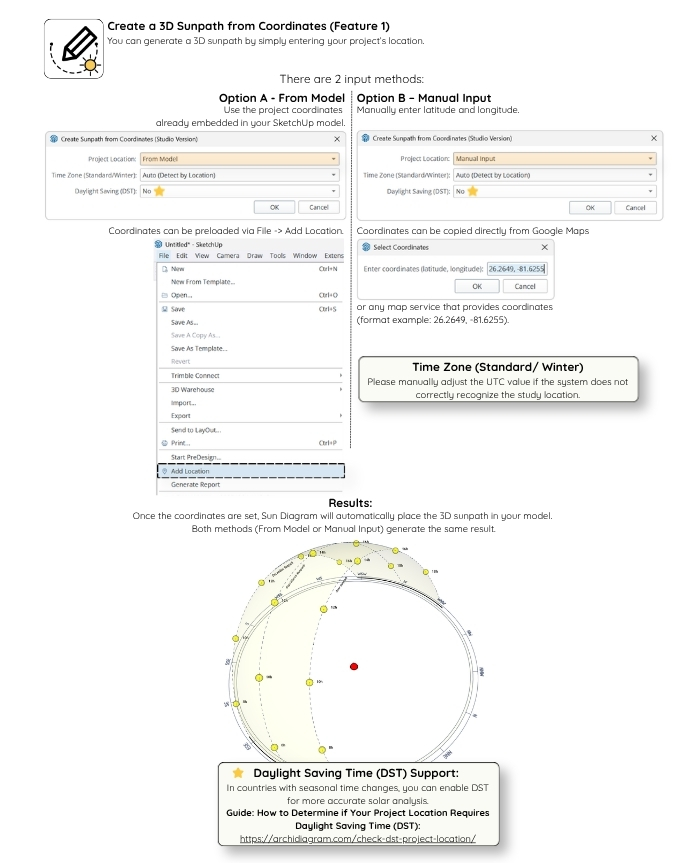
- Interactive 3D Sun Path: Instantly generate an accurate, visually stunning sun path diagram based on your exact geolocation.
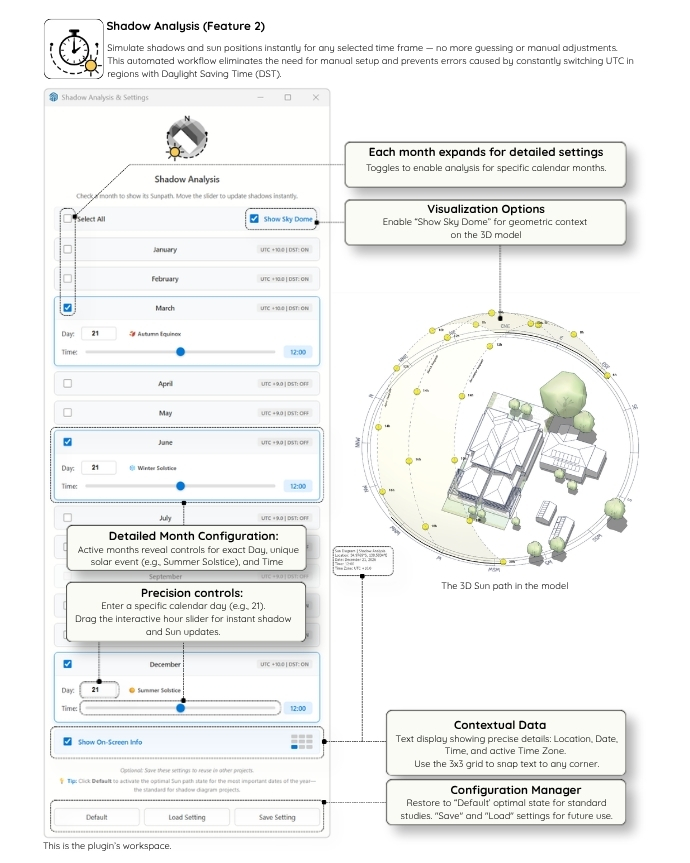
- Automated Shadow Studies: Set your desired time intervals and dates (e.g., Summer/Winter Solstices) and let the plugin automatically generate sequential shadow scenes.
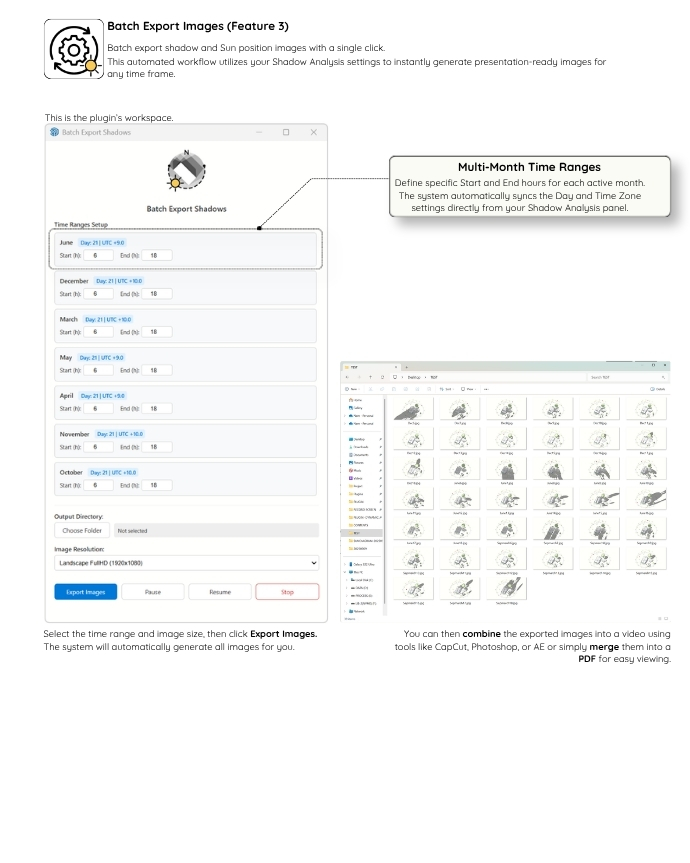
- 1-Click Batch Export: Export all your generated shadow scenes into high-resolution images in seconds—perfect for client presentations and local authority compliance.
- Smart Time Zone Engine: Automatically accounts for Daylight Saving Time (DST) ensuring your shadows are 100% accurate year-round.
Try It Risk-Free!
We want you to experience the full workflow without any barriers. Sun Diagram Pro comes with a 14-Day Free Trial (No Credit Card Required).
Ready to Upgrade? (Important Purchase Instructions)
Note: The SketchUcation system requires you to have a registered account to purchase and issue your license key securely.
Step 1: Please Log in or Register a free account at the top of this page.
Step 2: Once logged in, click the link below to access the checkout page. You can choose either the Perpetual (Lifetime) or 1-Year license from there:
Purchase License Here: https://sketchucation.com/purchase-smart.php?plugin=FebSunDiagramPro
Step 3: Check your inbox. Download the license key file sent to your email (Note: SketchUcation states that license emails can sometimes take up to 8 hours to arrive).
Step 4 (Activation): Open the extension in SketchUp, click "Activate License", and browse to select the license file you just downloaded. Please ensure your computer is online during this step so the system can validate your key.
For more resources and updates, visit our hub at archidiagram.com
Quick Start Guide: Sun Diagram Pro
Watch our quick overview video to see how to generate your first 3D sun path in seconds:
3 Simple Steps to Begin:
- Install: You can install the extension directly within SketchUp using the
Sketchucation ExtensionStoreplugin. Alternatively, download the.rbzfile from this page and install it manually viaWindow > Extension Manager. - Enjoy Free Trial: Your 14-Day Free Trial starts automatically as soon as you use any tool (no credit card or activation required). To check your remaining trial days or purchase a license, go to
Extensions > Sun Diagram (Pro) > License... - Generate: Click the Sun Diagram icon on your toolbar to instantly create an interactive 3D sun path based on your model's geolocation.
For more detailed settings, batch export instructions, and advanced features, please switch to the Documentation tab.
How to use Sun Diagram Pro for SketchUp
Sun Diagram Pro is the ultimate tool for architects and designers to create interactive 3D sun paths, conduct precise shadow studies, and automate batch exports directly within SketchUp.
1. Getting Started & Activation
- Access the tool: Navigate to
Extensions > Sun Diagram (Pro)in the SketchUp top menu. - 14-Day Free Trial: You can evaluate the full Pro experience for 14 days, completely free with no credit card required.
2. Core Features & Workflow
Generating the 3D Sun Path
- Generate an accurate, interactive 3D sun path instantly based on your SketchUp model's geolocation.
- Smart Time Zone Engine: Automatically handles DST (Daylight Saving Time) to ensure your shadow casting is 100% accurate year-round.
Customizing Diagram Styles
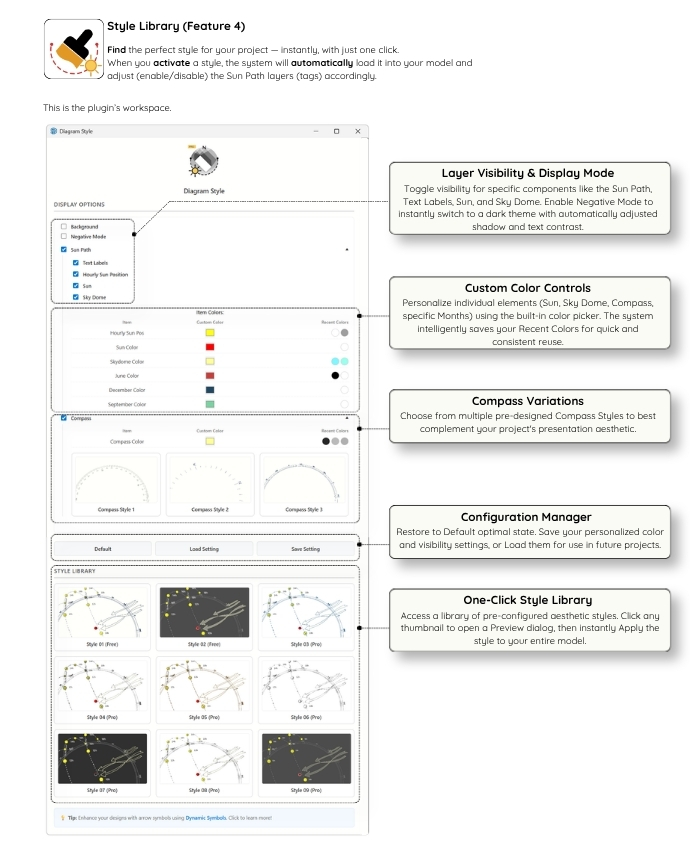
- Comprehensive Control: Use the newly overhauled Diagram Style panel to fully customize the visual appearance of your sun path (colors, line weights, opacity).
- Ultra-Clean Presentation: The sun path integrates seamlessly into your scene without messy section slices at the base, keeping your 3D model distraction-free.
Shadow Analysis & Batch Export
- Automated Studies: Set specific time intervals (e.g., every hour from 9 AM to 3 PM) and specific dates (e.g., Summer/Winter Solstice) to automatically generate sequential shadow scenes.
- Batch Export: Export all generated shadow scenes to high-quality images in just one click, saving you hours of manual work.
3. Support & Full Documentation
For comprehensive video tutorials, advanced use cases, and additional resources, please visit our official website: https://sundiagram.com
If you have any questions or need technical support, please use the https://community.sketchucation.com/topic/164902/plugin-sun-diagram-3d-sun-path-shadow-analysis-batch-export to reach out on the SketchUcation forum.
Version 4.5.6 (2026-07-015)
- User Experience Improvements: opening the extension's UI dialogs will no longer create unwanted "Undo" steps in SketchUp. Your undo history now stays perfectly clean, ensuring a smoother and uninterrupted modeling workflow.
Version 4.5.5 (2026-07-03)
- Bug Fixes & Stability Improvements: Fixed a critical issue where sun path hour labels (12h, 14h, 16h, etc.) would randomly disappear when saving the model in SketchUp 2023 and 2026.
Version 4.5.0 (2026-06-06)
Comprehensive Diagram Style Upgrade: We have completely overhauled the Diagram Style panel to give you ultimate control over your sun paths appearance. You can now dive deeper into customization with our new, intuitive interface.
Ultra-Clean Sun Path: We finally removed the Section Slice at the base! Enjoy a seamless, distraction-free 3D model without any messy cuts.
Version 4.0.2 (2026-04-01)
Flexible 3D Sun Path & Sky Dome (New): Generate a dynamic 3D solar dome showing the suns trajectory across all 12 months. Effortlessly analyze critical times like Solstices and Equinoxes, or customize it for any specific day of the year.
Instant Shadow Control & Smart DST: No more manual UTC guessing. Our system automatically calculates the correct Daylight Saving Time offsets. Use the new interactive dashboard to slide through time and see shadows update instantly.
One-Click Batch Export: Save hours of manual work. Automatically generate high-resolution (up to 4K) shadow sequences with a single click — now fully supporting your custom On-Screen HUD overlays.
Version 3.5.1 (2026-02-11)
Smart Time Zone Engine: Removed the hardcoded UTC+8 override for East Asia, allowing for accurate geometric time calculations.
Stability: Optimized Undo/Redo stack performance for Shadow Analysis.
Security Patch: Enhanced handling of special characters in file paths (Unicode/Windows paths).
Bug Fixes: Fixed broken external links (Website/Email) in the About dialog.
Version 3.5 (2026-02-06)
Smart Time Zone Engine: Enhanced algorithm with Regional Overrides to accurately handle locations where political time differs from solar time (e.g., Western Europe, China).
Flexible Time Zone Setup: New global time zone dropdown menu; users can now choose between Auto-detection or Manual override for projects located near time zone borders.
Vertical Resolution Support (9:16): Added vertical export options (FullHDV, 2KV, 4K_V) specifically designed for mobile presentations and social media (TikTok, Reels, Shorts).
Modernized UI/UX: Fully optimized for a seamless experience in SketchUp 2026.
Version 3.4 (2025-11-25)
3D Sun Path: Added a yellow 3D Dome surrounding the Sun Path.
Assigned the Dome to a new tag named Feb_Dome.
Version 3.3 (2025-11-14)
Improved Style: Added Style 09 Pro.
3D Sun Path: Text on the Sun Path is now bold for better visibility.
Version 3.2 (2025-09-16)
- Improved Style: These updates make your sun visuals clearer and models easier to view, with no changes to how the plugin works.
Version 3.1 (2025-08-16)
- Updated the control panel UI for clarity.
Version 3.0 (2025-07-30) - Major Update
Improved interface with a new toolbar.
Optimized performance and faster image export.
New feature: Style Library for your diagrams with instant style switching.
Fully redesigned user interface.
Version 2.4 (2025-04-19)
Sun Path now displayed with dashed lines in any SketchUp STYLE.
Added Compass Style 2 and 3, fully vector-based and selectable in the Tag (layer) panel.
Export images at unlimited resolution ensuring sharp, high-quality visuals for printing and presentations.
Author:
All my plugins
Downloads: 877
Size: 4.17 MB
Version: 4.5.6
Categories: Shadows
Compatibility: v2020, v2021/22, v2023, v2024, v2025, v2026
Updated: 2026-07-15
Log in to Get It!