Browse, install and update extensions directly in SketchUp with Sketchucation Tools
Download Now
LookAt v1.1
- Overview
- Documentation
- Release Notes
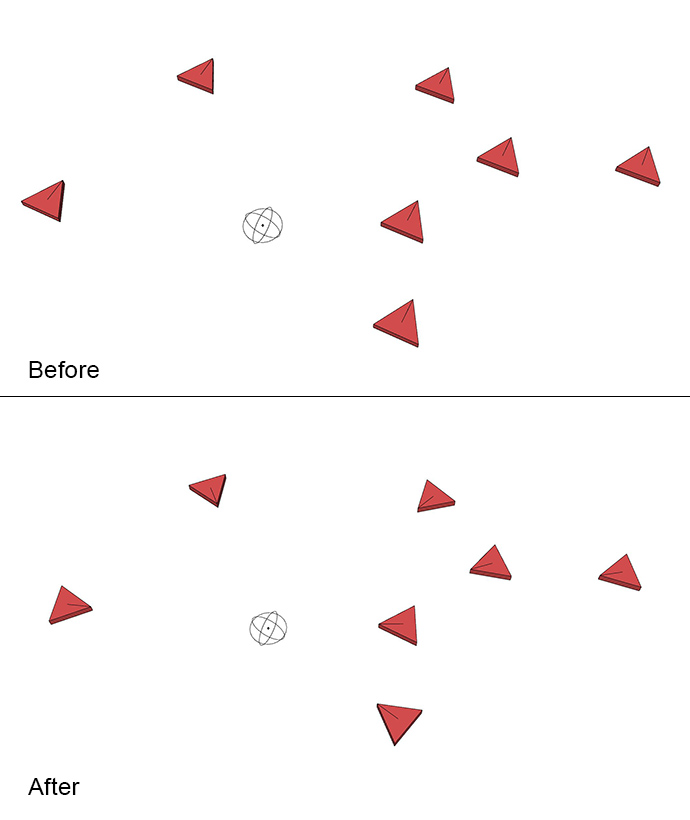
The script can be found under Extensions - LookAt. First create an Attractor with the script. Place it where you want the other components to look. Select the Attractor and the other groups and/or components and then run Look At to rotate the them towards the attractor. LookAt rotates around the World Z axis so it's only looking in the X and Y direction.
v1.1 fixed a bug when more than one Attractor was created. The script won't give error with several Attractors now but as only one Attractor is used it can be random which it uses so only select one Attractor.
The script can be found under Extensions - LookAt. First create an Attractor with the script. Place it where you want the other components to look. Select the Attractor and the other groups and/or components and then run Look At to rotate the them towards the attractor. LookAt rotates around the World Z axis so it's only looking in the X and Y direction.
v1.1 fixed a bug when more than one Attractor was created. The script won't give error with several Attractors now but as only one Attractor is used it can be random which it uses so only select one Attractor.
v.1.0 v.1.1 Fixed two bugs.
Author:
All my plugins
Downloads: 1142
Size: 0.00 MB
Version: 1.1
Categories: Modification
Compatibility: v2017, v2018, v2019
Updated: 2019-08-10